A badge on the wall: repurposing hacker camp hardware as a home energy display
I wanted a wall display for my house’s energy. Not an app, but something glanceable, always on, no clicks required. Apparently that’s harder to buy than it sounds.
On a sunny day, it makes sense to turn on energy-intensive appliances such as washing machines, because the energy surplus from our solar panels earns us almost nothing.
This data is available in my Home Assistant (HA) setup, but that takes a few clicks on a phone or laptop. I wanted something equivalent to a good old-fashioned barometer, quietly hanging on the wall. A glance in passing should be enough to tell me what I need.
But I could not find any straightforward solutions for connecting a display directly to HA. If there was one, I would have bought it.
I cycled through several ideas, until I remembered that I had a couple of badges from hacker camps lying around. Hacker camps are like festivals for people who like to tinker and think out of the box.
Anything from hacking Tesla’s, water propelled rockets, DIY electron microscopes, electronics, musical robots, to retro games on vintage hardware.
For MCH2022, I brought my nephew with me, who had recently started out as a chips designer. I remember him joking to me: “finally, we are amongst normal people!”
Part of the tradition of these camps is that they come with a custom built badge. In the old days this would just be a digital name tag, but they evolved to be esoteric bleeding edge developer IoT boards. The badges that I collected over the years survived several rounds of decluttering my house, I suspect because they are cute collectors’ items with fond memories attached.
The MCH badge has most of the features (display, buttons, WiFi) I wanted. In the future I might want the device to be ultra energy efficient (as in: runs on batteries for months), but for a prototype the badge looked very appropriate.
The next step then is thinking about the way to connect the board to HA with the minimum amount of work. I did some quick research, for example to use a REST API, but it looked like a lot of programming on both the device side and the HA side.
What unlocked the solution in my mind was the realization that we are just sending messages asynchronously to the display device. The display device is a subscriber to those messages. You can try to build your own software for that, but MQTT (the standard protocol for IoT messaging) is designed for this, and support for it is standard in HA. In addition, I already had an MQTT server operational for a different purpose.
The project then neatly decomposes into two parts:
- getting the data published by HA to an MQTT topic, and
- picking up that data by an MQTT client running in the badge.
The badge has no general-purpose operating system, but it does have a MicroPython interpreter.
There is also a MicroPython umqtt.simple module, exactly what we need.
Interestingly enough, Claude has knowledge about MicroPython from its training data. In addition, it reviewed the badge API docs that I gave it, which are a bit more specific on the display and WiFi peculiarities.
With Claude and Claude Code, building the software was a breeze. Deploying had some hiccups, though. There were some library updates on the scripts that deploy software to the badge since 2022, which distracted for a while, but nothing really serious.
I had Claude Code use those scripts to deploy the software to the badge. I did not get around to figuring out how to also test the software through Claude Code, which forced me to act as a manual relay. Once we overcame the hurdle of deploying the software to the badge, the 0.1 version worked out of the gate. This was the version that just received MQTT messages.
The next thing I wanted was a graceful exit on pressing a key. This failed in the first attempt because the badge API docs were a bit ambiguous, related to a recent change.
Other than the messaging logic, I had Claude Code also propose a few GUI mockups, wireframe style. I only had to make a few comments, and Claude Code (Sonnet 4.6) produced the code.
With the basic logic operational, I turned to the HA side of the project. Claude Code had no trouble coming up with alternative approaches for configuring HA.
What it could not do was look in my HA setup. An HA MCP server is available, but for looking up the three required entity names (solar, energy consumed, energy produced), installing it felt overly complicated.
Instead, Claude Code gave me the full YAML spec for an automation, which is triggered by any change in the state of any of the three entities.
If I had not messed up matching the entity names across HA and the badge software, it would have worked on the first attempt. Instead the badge confidently showed three zeroes for all values. I should have installed the MCP server instead of being a sloppy relay, manually copying names between two development environments.
Functionally the energy monitor objective was now fulfilled. It worked, which took just a few hours. Buying an appliance to do it would have been more expensive, would still require configuration, and would not have been as fun and instructive as this project.
Then I turned to the color and font design. I handed Claude Code a picture of the badge and a link to the style guide, and it came up with some suggestions. I selected a simple one, and it got it right in one go. The result is in the picture.
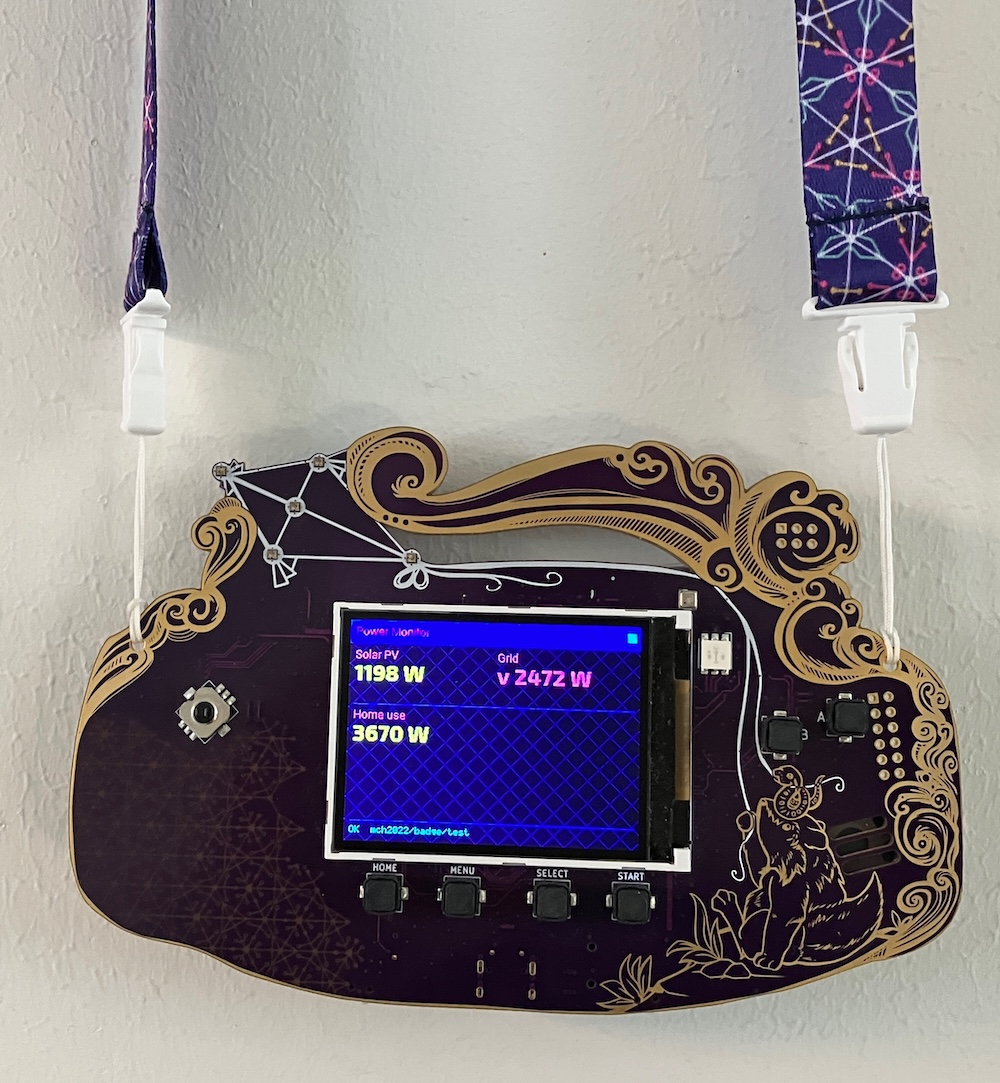
It hangs on the wall now. A quick look in passing tells us when to run the washing machine.
I loved working with the AI-assisted coding. It works amazingly well, at least for these types of projects, and given the right requirements and documentation. Next time I’d work first on connecting the coding agents more directly to the deployment environment, in this case the badge and HA. Every time I acted as a relay, copying entity names, looking at the badge screen, I introduced errors.
The deeper lesson isn’t about the technical detail of the badge or MicroPython. MQTT will give you a digital infrastructure that simplifies adding new components. The hard part is noticing that.